GYOTAK ships sashimi-grade frozen fish from Hua Hin, Thailand, and customers can order directly from an AI chat such as Claude. This page is for people who want to introduce GYOTAK to their own customers or contacts and earn a referral fee on the resulting orders.
GYOTAK จัดส่งปลาแช่แข็งระดับซาชิมิจากหัวหิน ประเทศไทย และลูกค้าสั่งซื้อได้โดยตรงจากแชท AI เช่น Claude หน้านี้สำหรับผู้ที่ต้องการแนะนำ GYOTAK ให้ลูกค้าหรือคนรู้จักของตนเอง และรับค่าแนะนำจากคำสั่งซื้อที่เกิดขึ้น
約18秒・音声なしAbout 18 seconds, no audioประมาณ 18 วินาที ไม่มีเสียง
参加条件
Eligibility
เงื่อนไขการเข้าร่วม
GYOTAK の MCP URL をお使いの AI のコネクタに登録すると、GYOTAK サイトへの ID・パスワード登録なしに、ご利用の AI のチャット画面から直接注文できます。その注文の入金が確認されると、自動で紹介者になれます(下記「紹介者になるには」)。
VIP・法人のお客様は LINE またはメールでお問い合わせください。GYOTAK が確認のうえ、あなた専用の接続 URL を発行します。
Register GYOTAK's MCP URL as a connector in the AI you already use, and you can order directly from that AI's chat — no GYOTAK account or password needed. Once the payment for that order is confirmed, you automatically become a referrer (see "How to become a referrer" below).
VIP and corporate customers: contact us on LINE or by email, and GYOTAK will review your account and issue a connection URL that is unique to you.
ลงทะเบียน MCP URL ของ GYOTAK เป็น connector ใน AI ที่คุณใช้อยู่ แล้วคุณจะสั่งซื้อได้โดยตรงจากหน้าแชทของ AI นั้น โดยไม่ต้องสมัครบัญชีหรือตั้งรหัสผ่านกับเว็บไซต์ GYOTAK เมื่อยืนยันการชำระเงินของคำสั่งซื้อนั้นแล้ว คุณจะกลายเป็นผู้แนะนำโดยอัตโนมัติ (ดู "วิธีเป็นผู้แนะนำ" ด้านล่าง)
You may share the URL anywhere: social media, a blog, or directly with your customers. If you are technical, you can also build the URL into your own MCP server, custom GPT, or skill and offer it with your own interface.
Open Settings → Connectors (or Apps) → Advanced and turn on Developer mode, then use "Create" to register the connection URL. Product cards are not shown; you check stock and order in plain text. Verification is in progress.
Introduce GYOTAK in your own words. We do not write the text for you: what you actually tasted carries further than a template everyone else is posting too.
材料が要るときは、チャットで「投稿文の材料を出して」と伝えてください。あなたの紹介 URL、直近に注文した魚、使える写真の URL、言ってよいこと、言ってはいけないことが返ります。文章にするのは、あなたとあなたが使っている AI です。
When you need the raw material, say in chat: "Give me the material for a post." You get your referral URL, the fish from your latest order, photo URLs you may use, what you may claim, and what you must not claim. Turning that into a post is up to you and the assistant you use.
To see how you are doing, say in chat: "Show my referral stats." You get the number of referred orders, this month's estimated commission, your unpaid balance, and whether your payout destination is registered.
Optional: if you want the photo you take yourself to carry a capture record (time, approximate location, hash of the original), say so in chat and you get the URL of the capture page. Only the province is published; the exact coordinates are visible to GYOTAK administrators only. Not using it does not affect your referral fee.
State clearly that it is a referral link (#PR, "this is my referral link", or similar). Regulations in Japan and Thailand require it.
Do not write that the service runs on a production network, or that this order is recorded on-chain. We currently run on a test network (preprod), and the order itself is not stamped.
Do not make absolute claims about medical or health benefits, being the cheapest, or being exclusive.
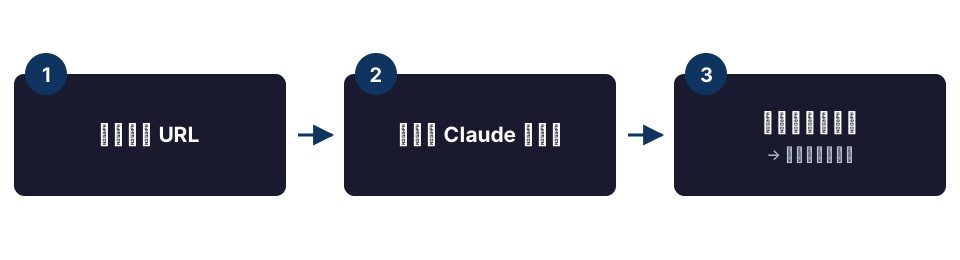
Connect to GYOTAK in Claude / ChatGPT and place an order
Once your payment is confirmed, your personal referral URL arrives by email
Share that URL. For every order by someone who registers it, you earn 5% of the product subtotal (shipping excluded, paid orders only, closed at the end of each Thai calendar month)
The connector you use for your own orders can stay on the URL you first registered. Your own referral URL is for sharing with other people; you do not need to re-register anything
You can register your payout destination in chat: say "Register my payout destination" and a form opens. Choose PromptPay (the QR is read inside the form) or a stablecoin (USDC on Base, USDM on Cardano)
If the form does not open, remove the connector and add it again with the same URL — new features appear after re-adding it
Lost the URL? Ask in chat: "Show me my referral URL" (apply_referrer)